 PyLops
Note
Go to the end to download the full example code.
3D Smoothing
This example shows how to use the pylops.SmoothingND operator
to smooth a three-dimensional input signal along all axes.
import matplotlib.pyplot as plt
import numpy as np

import pylops

plt.close("all")
Define the input parameters: number of samples of input signal (N1,
N2, and N3) and lenght of the smoothing filter regression coefficients
(\(n_{smooth,1}\), \(n_{smooth,2}\) and \(n_{smooth,3}\)).
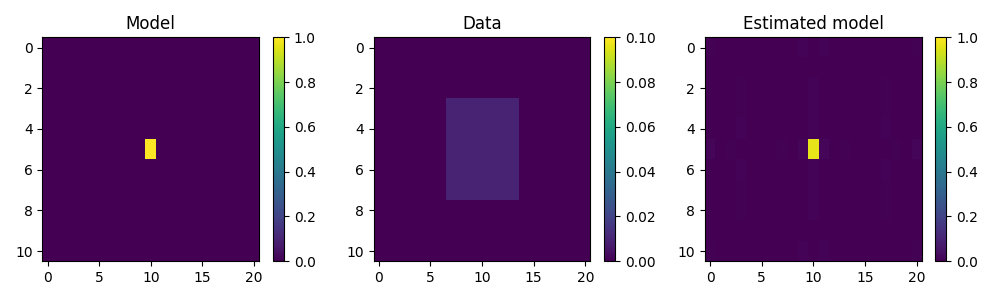
The input signal is one at the center and zero elsewhere.
After applying smoothing, we will also try to invert it.
Aest = Sop.div(B.ravel(), niter=2000).reshape(Sop.dims)

fig, axs = plt.subplots(1, 3, figsize=(10, 3))
im = axs[0].imshow(A[..., 7], interpolation="nearest", vmin=0, vmax=1)
axs[0].axis("tight")
axs[0].set_title("Model")
plt.colorbar(im, ax=axs[0])
im = axs[1].imshow(B[..., 7], interpolation="nearest", vmin=0, vmax=0.1)
axs[1].axis("tight")
axs[1].set_title("Data")
plt.colorbar(im, ax=axs[1])
im = axs[2].imshow(Aest[..., 7], interpolation="nearest", vmin=0, vmax=1)
axs[2].axis("tight")
axs[2].set_title("Estimated model")
plt.colorbar(im, ax=axs[2])
plt.tight_layout()
Total running time of the script: (0 minutes 1.547 seconds)